
How Can We Help?
Adobe Creative Cloud – Faculty & Staff
Adobe Software Overview
All Faculty and Staff have access to the Adobe Creative Cloud Suite. However, Faculty and Staff must first request access to the Adobe Suite by reaching using the methods listed at the bottom of this page.
Getting Started
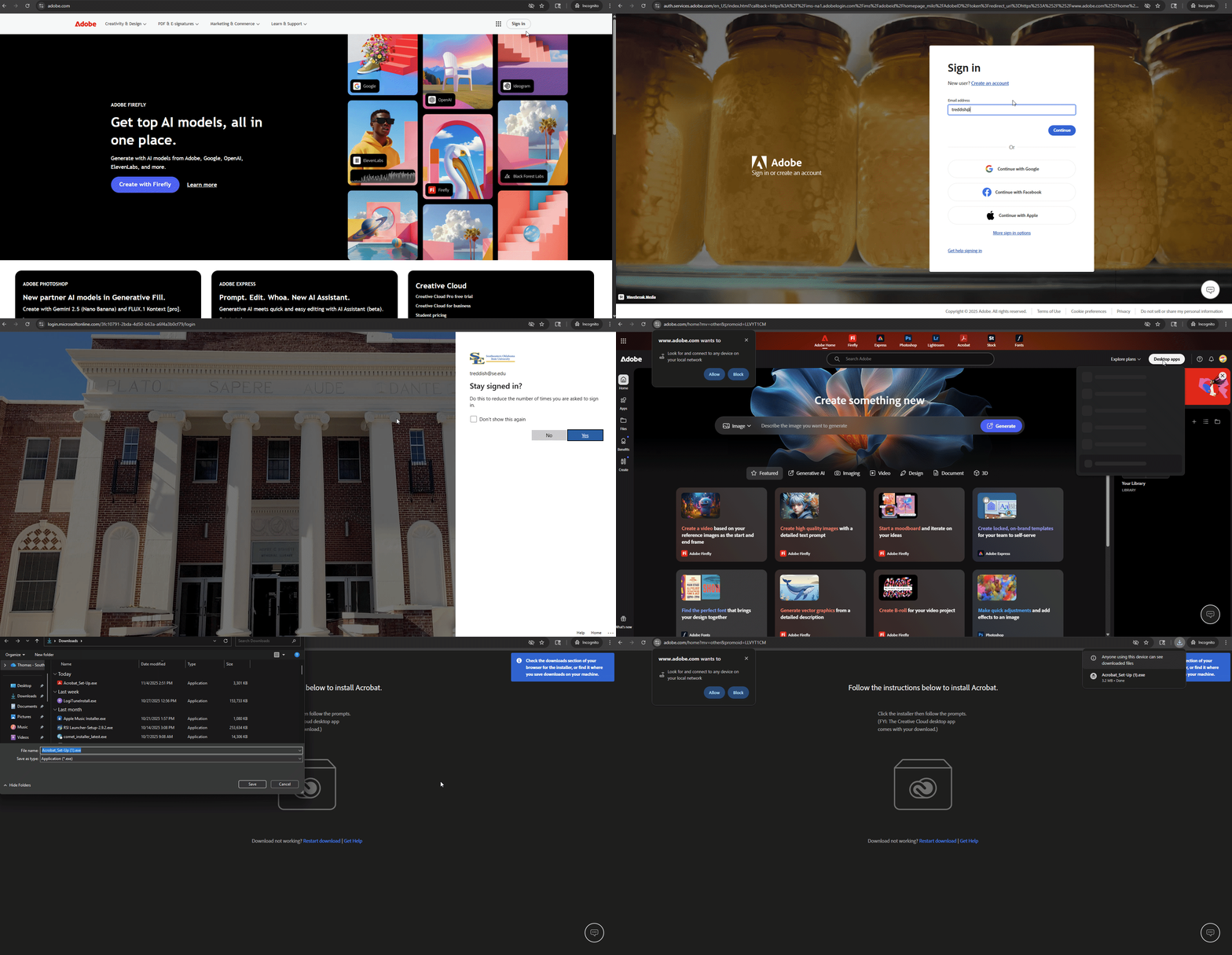
- Visit https://www.adobe.com and press Sign In at the top right, then use your SE email address to sign in.
- If prompted, select Company or School Account and then enter your password. Or provide your credentials in your school’s login screen.
- From the Creative Cloud website, at the top right-hand side of the page, you will see a Desktop Apps button. Click it, then select Adobe Acrobat from the drop down.
Contact Us
As always, if you have any further troubles or need assistance you can reach out using the following methods.
Support Ticket: https://support.se.edu
Phone: 580-745-2408
Email: it@se.edu